
Closing the word application
Closing the word application- To close the Microsoft Word application, you can follow these steps: Using the X Button: Look in the top-right corner of the Word window for the…



Closing the word application- To close the Microsoft Word application, you can follow these steps: Using the X Button: Look in the top-right corner of the Word window for the…

Creating a new document- To create a new document, you can follow these general steps: Choose a Text Editor or Word Processing Software: You can use various software applications to…

Opening a document- To open a document on your computer or device, you'll typically follow these general steps: Locate the Document: Find the document you want to open. It might…

Closing document- If you want to close or end a document, you can follow these general steps, but keep in mind that the specific method may vary depending on the…

Previewing and printing document- Previewing and printing a document typically involves using a software application to view the document before sending it to a printer for physical output. The specific…

Saving a document- Saving a document depends on the software or application you are using. Here are some general steps for saving a document: Open the Document: First, make sure…

Editing a document- Editing a document can involve several different types of editing, each serving a specific purpose. Here are the main types of document editing: Proofreading: Purpose: Focused on…

Composing a simple document- For a basic document, you might want to include the following sections: Title (Optional): A brief, descriptive title for your document. Introduction: An opening section that…
Starting Word 2000- Microsoft Word 2000 is a word processing software program that was part of the Microsoft Office suite. It was released in 1999 as the successor to Word…
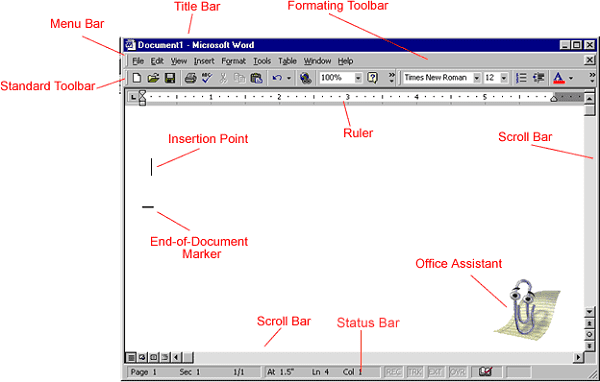
Microsoft Word 2000- Microsoft Word 2000 is a word processing software application developed by Microsoft. It was released as part of the Microsoft Office 2000 suite of productivity software. Here…